
ABCmouse Review: Is It the Best Learning App for Kids?
I didn’t want screen time in our house to mean another hour of Paw Patrol. ABCmouse is what my daughter gets on her iPad when I need to make dinner or finish work — and it’s a lot less of a fight to turn off than the TV ever was. Here’s why that happens, what she actually learns, what it costs, and how to get a 6-week free trial through our link (then $14.99/mo. until canceled).
Straight up: my daughter Zoe uses ABCmouse and loves it, and I like it as a parent for one specific reason: if screen time is going to happen anyway, I want it to be time she gets something out of. The Niftiest earns a commission if you sign up through links on this page; it doesn’t change what I’d tell you.

- Best for: parents of young kids who want screen time to be learning time — the 20 minutes you need to make dinner or finish work, spent on lessons instead of another episode
- Scope: 13,000+ activities with Premium · Reading and Math Learning Paths · ages 2–8
- Cost: ABCmouse Basic is free (10 activities a day) · Premium is $14.99/mo. until canceled or $79.99/yr until canceled on the web
- Best way to start: the 6-week free trial through our link (then $14.99/mo. until canceled)
The 5 p.m. problem
If you have a preschooler, you know the stretch I mean. It’s late afternoon, dinner isn’t going to cook itself, there’s one more work thing to finish, and your kid needs you right now. Some nights the only way anything gets done is a screen. I’m not going to pretend otherwise, and I don’t think you should feel bad about it either.
For a long time, that screen in our house was the TV, and it was usually Paw Patrol. I have nothing against the pups. But it never felt like Zoe was getting anything out of it, and turning it off was a fight every time. She’d get wired, then emotional, and we’d have a meltdown right when I was trying to get food on the table.
What I wanted was simple: if she’s going to have screen time, I want it to be more purposeful. I want her using her brain, not just watching. That’s why she has ABCmouse. She’s working through lessons, earning tickets and spending them on her hamster, and when I tell her it’s time to put the iPad away, it’s much less of a fight than TV time ever was. I’m a lot happier about screen time when I know she’s engaged and learning something.
That experience got me interested in what research says about how screen time ends for young kids.
Why turning off the TV is so hard (it’s not just your kid)
Researchers at the University of Washington interviewed parents of toddlers and preschoolers and had other families keep diaries of how screen time went, including how it ended (Hiniker and colleagues, 2016). Parents said they mostly turn screens on so they can get something done, and turn them off when they’re ready to give their child their full attention. That hand-off, in the researchers’ words, “is often painful.”
What made it less painful: stopping when the technology itself reached a natural end point. Endings the device handled went noticeably better than endings a parent had to enforce. And one result surprised me: the classic “two more minutes” warning didn’t help. In their data, it made things worse.
Autoplay is the other piece. In a follow-up study (Hiniker and colleagues, 2018), the same lab gave families a video player for their preschoolers. When it automatically queued up more video after the planned one ended, kids watched longer and parents had to step in more often.
Pace matters too. In a well-known 2011 study in Pediatrics, four-year-olds who watched nine minutes of a fast-paced cartoon did worse right afterward on tasks that test focus and self-control than kids who watched a slower educational show or drew pictures (Lillard and Peterson).
None of that makes cartoons evil. It explains why a show that never ends on its own is so hard to walk away from, and why a kid who has just finished an activity is easier to redirect than one pulled away mid-episode.
What this looks like in our house: With ABCmouse, each activity has a clear finish, which gives us a natural stopping point.
What “educational” should actually mean
A lot of apps call themselves educational. A useful yardstick comes from learning scientists (Hirsh-Pasek and colleagues, 2015): an app teaches best when a child is actively thinking, engaged rather than distracted, doing something meaningful that connects to their world, and ideally talking about it with a grown-up. Here’s how ABCmouse measures up.
| What good looks like | How ABCmouse does it |
|---|---|
| Active: the child is thinking, not just watching | Educator-designed Learning Paths in Reading and Math give purposeful guidance, so children are always moving on to the appropriate next step. |
| Engaged: nothing pulling attention away | No 3rd party ads or popups. The one watch-out: the tickets-and-rewards system motivates most kids, but a few will chase rewards over lessons. |
| Meaningful: skills that show up off the screen | Reading, math, science, social studies, art and music, from preschool through 2nd grade, plus STEM learning games, coding fundamentals and Safari Park life science exploration. |
| Social: talking about it with a grown-up | This one is on you, and it’s worth it: sit with them for the first few sessions and ask them about what they’re doing. |
How we arrived at 4.6
Our rating weighs four things, the same way on every review (how we review). Sub-scores are out of 5.
| Criterion | Score | What the evidence says |
|---|---|---|
| Value for money | 4.5 | A 6-week free trial through our link (then $14.99/mo. until canceled) and a free Basic tier. That costs more than a free app, for far more content. |
| Real-world performance | 4.7 | 13,000+ activities with Premium and personalized Learning Paths in Reading and Math. Tickets earned for progress expand what kids can do in Pet Town, Aquarium and Hamster Maze, which keeps them coming back. 4.1 out of 5 from about 146,000 App Store ratings. My own kid likes it. |
| Transparency | 4.5 | Trial length and the price after it are shown before you pay, and you can cancel at any time to avoid future charges. |
| Safety and support | 4.8 | No 3rd party ads or popups, the kidSAFE+ COPPA Seal as a COPPA-compliant program, and up to three child profiles with Premium. |
The four sub-scores average 4.625, which we publish as 4.6.
What your child actually gets
This review covers the all-new ABCmouse, for kids ages 2–8, from preschool through 2nd grade, across reading, math, science, social studies, art and music. ABCmouse Premium includes 13,000+ activities, Reading and Math Learning Paths, grade-level customization for each child profile, activity replay, and up to three child profiles. ABCmouse Basic is free: 10 activities a day. ABCmouse runs in a web browser on a laptop or desktop as well as in the mobile apps.
What’s new in the all-new version: upgraded visuals and technology, STEM learning games and activities, coding fundamentals, Pet Town narrative play and Safari Park life science exploration, with activities built around critical thinking, pattern recognition, strategic reasoning, executive function and healthy learning routines.
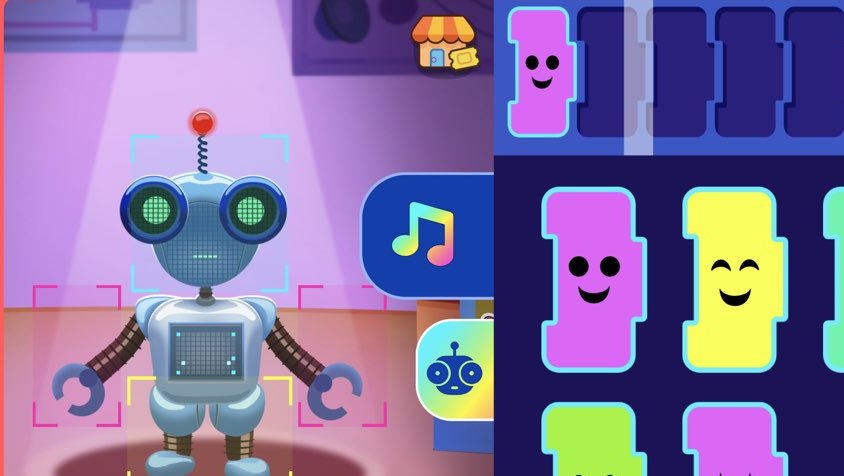
Three things make it work day to day. Rewards kids actually chase: ABCmouse rewards progress with tickets that kids use to expand their experiences in Pet Town, Aquarium and Hamster Maze. A guided path: educator-designed Learning Paths in Reading and Math make sure children are always moving on to the appropriate next step. A safe place to play: no 3rd party ads or popups, and ABCmouse has earned the kidSAFE+ COPPA Seal as a COPPA-compliant program.
How to make it the easy kind of screen time
These are the five things we do in our house, and they’re what I’d tell a friend who’s about to try it.
- Stop at the end of an activity, not in the middle of one. “Finish this game, then we eat” lands better than pulling the iPad away.
- Agree on the stopping point before the iPad comes out, instead of a two-minute warning. “Two games, then dinner” or “until the timer says we’re done” gives your kid a finish line they already know. In the University of Washington study, the countdown warning made endings worse, while ending at a natural stopping point, or letting the device end it, went better. When the time comes, tell them what’s next (“finish this one, then come help me set the table”) so they’re moving toward something, not just away from the iPad.
- Sit with them for the first couple of sessions, so lessons stay the point and the rewards don’t take over.
- Give it a job in the routine: ABCmouse while you make dinner, then screens off and everyone at the table.
- Keep it out of meals and bedtime. That’s where the American Academy of Pediatrics now puts its emphasis.
Pricing: how to get the best deal
| Plan | Price | Good to know |
|---|---|---|
| ABCmouse Basic | Free | 10 activities a day |
| ABCmouse Premium, via our link | 6 weeks free, then $14.99/mo. until canceled | 6-week free trial for new subscribers, then $14.99/mo. until canceled. 13,000+ activities, Reading and Math Learning Paths, up to three child profiles. |
| ABCmouse Premium, annual (web) | $79.99/yr until canceled | Renews at $79.99/yr until canceled |
Want to try before you buy? Our link gets you a 6-week free trial (then $14.99/mo. until canceled), and ABCmouse Basic (10 activities a day) lets you preview the content for free.
Ratings and research
| Source | Score | Context |
|---|---|---|
| Apple App Store — ABCmouse: Kids Learning Games | 4.1 / 5 | About 146,000 ratings for the all-new ABCmouse app, checked October 13, 2026 |
| Better Business Bureau | A− | Age of Learning, Inc.; not BBB-accredited; 38 complaints in three years, 9 of them billing |
| kidSAFE Seal Program | kidSAFE+ COPPA Seal | Earned by ABCmouse as a COPPA-compliant program |
ABCmouse’s own research claim, in its words: “ABCmouse DOUBLES Early Learning Gains in Reading and Math.”*
*Randomized control trial conducted by Age of Learning. PreK children used ABCmouse for at least 2 days/week and for at least 1 hour per week. Go to www.aofl.com/research for more information.
Who it’s for — and who should skip it
ABCmouse is a great fit if: you have a young child (ABCmouse is built for ages 2–8), you need a stretch of independent screen time most days, and you want that time to be lessons instead of another episode. It also suits families with up to three young kids on one Premium subscription, and anyone who wants a laptop option.
Consider something else if: your only goal is learning to read and you want a phonics-only app for that single lane, or if you’d rather start with a free app.
Frequently asked questions
Is ABCmouse better than letting my kid watch TV?
They’re different kinds of screen time. ABCmouse asks your child to do things, and each activity has a clear end, while most shows are built to keep playing. That doesn’t make all TV bad: slow-paced shows like the ones on PBS Kids are what pediatricians recommend. In our house, ABCmouse is simply easier to feel good about and much easier to turn off.
How much screen time is OK for a preschooler?
For years the American Academy of Pediatrics suggested about an hour a day of high-quality programming for ages 2–5, watched together where possible. Its February 2026 update moved away from strict minute counts and toward what kids are watching and how screens fit family life, like keeping meals and bedrooms screen-free.
Will my kid fight me when it’s time to stop?
No app can promise that. What helps, according to the research, is agreeing on the stopping point up front and ending there, or letting the device end the session instead of a parent. With ABCmouse, that means finishing the activity before the iPad goes away.
Is there an ABCmouse free trial?
Yes. Through our link, new subscribers get a 6-week free trial (then $14.99/mo. until canceled).
How much does ABCmouse cost?
ABCmouse Premium is $14.99/month or $79.99/year on the web, each renewing until canceled. ABCmouse Basic is free: 10 activities a day.
What ages is ABCmouse for?
Ages 2 to 8, from preschool through 2nd grade.
How do I cancel?
You can cancel at any time to avoid future charges. If you’re on the 6-week free trial through our link (then $14.99/mo. until canceled), cancel before the six weeks are up if it isn’t a fit.
Bottom line
Screen time is going to happen in most houses with a preschooler, usually right around dinner. ABCmouse is how I make peace with it: Zoe is learning instead of zoning out, the lessons end on their own, and putting the iPad away is a much smaller fight than turning off the TV. It’s the most complete early-learning app we’ve reviewed. Start with the 6-week free trial through our link (then $14.99/mo. until canceled) and see how your kid does.
Start Your 6-Week Free Trial →Then $14.99/mo. until canceled.